Seller Analytics & Payouts
Verified Marketplace sellers can track performance of their listings and withdraw earnings directly to their payout method. This page explains how to access analytics, understand your numbers, and request payouts safely.
All tools are available from the /create area under Create and Manage your Listings, where you'll find two dedicated entries: Analytics and Payout.
Accessing Analytics & Payout Tools
Only verified publishers (users who have accepted the Marketplace Terms & Conditions and created at least one listing) can access seller analytics and payout tools.
- Go to the /create page while signed in.
- Open Create and Manage your Listings.
- Use the two main actions:
- Analytics – view performance, earnings to date, and listing stats.
- Payout – manage your balance, payout methods, and withdrawals.
If you don't see these options, make sure you've become a publisher and created a listing. See Publishing on the Marketplace for details.
Analytics Dashboard
The Analytics view gives you a high-level overview of how your listings are performing over time: revenue, orders, and trends per listing.
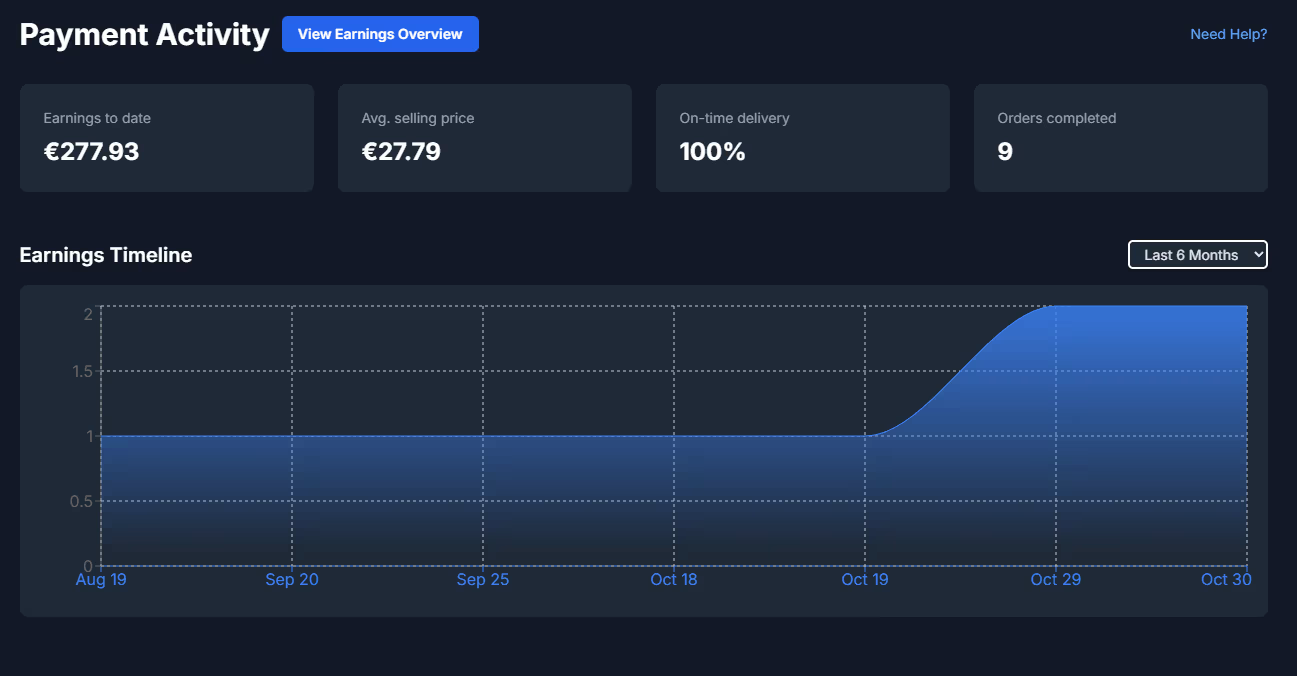
Key metrics
- Earnings to date: total revenue from all completed orders (e.g.
€277.93). - Average selling price: mean order value across your paid listings (e.g.
€27.79). - On-time delivery: fulfillment reliability for deliverables (e.g.
100%). - Orders completed: total number of successfully completed orders (e.g.
9). - Earnings Timeline: time series chart (e.g. Last 30 Days) visualizing when revenue was generated.
Per-listing analytics
Below the overview, you'll see a table with each listing and its financial results:
- Listing title & short description snippet
- Price (e.g. €14.99, €49.95, €99)
- Listing creation or first sale date (e.g. 19.10.2025)
- Actions: View (open listing) and Delete (unlist)
This section is ideal to quickly identify top performers (high revenue / high volume) and underperforming assets which might need a better thumbnail, description, or price.
Earnings & Payout Overview
The Payout page focuses on your balances, cash flow, and payment activity. It's where you see how much you can currently withdraw and what has already been paid out.

Current balances
- Available Balance: amount currently ready to withdraw (e.g.
€75.70). - Withdrawn so far: cumulative payouts already sent to you (e.g.
€180.00). - Upcoming Payments: amounts still in clearing or pending status (e.g.
€0.00). - Active Orders: revenue tied to ongoing or not-yet-cleared orders (e.g.
€0.00).
Lifetime performance
- Earned Since Joining: total earnings across the lifetime of your seller account (e.g.
€277.93). - Expenses: potential outgoing costs (e.g. promotion or fees; currently shown as
€0.00in your example). - Earnings Timeline: another chart showing income over time (e.g. Last 30 Days with a graph).
Payout Methods & Withdrawals
Before you can receive money, you need to configure at least one payout method. Once this is in place and your balance has reached the minimum payout threshold, you can request a withdrawal with a single click.
Setting up a payout method
- Navigate to the Payout page from the
/createarea. - Click Manage payout methods.
- Complete the onboarding flow (handled via Stripe or another payout provider).
- Verify your identity and bank details if required by your region.
This process ensures that funds can only be withdrawn to verified accounts and helps keep the marketplace compliant and secure.
Withdrawing earnings
After you have a payout method and a sufficient available balance, you can initiate a withdrawal:
- Check your Available Balance (e.g. €75.70).
- Ensure it is above the minimum threshold (see below).
- Click the Withdraw button.
- Confirm the payout destination and amount.
Withdrawals are processed through the payout provider (e.g. Stripe) and may take a few business days to reach your bank account, depending on region and payment rails.
Thresholds, Timeline & Activity Log
Payout threshold
To keep payouts efficient and reduce transaction overhead, there is a minimum payout threshold:
- Minimum balance: you must have at least $50 equivalent in your available balance before you can request a payout.
- If your available balance is below this threshold, you can continue to sell items and accumulate earnings until you qualify.
Payment activity log
The payout view includes a detailed Payment Activity table listing every earning and withdrawal:
- Date: when the activity happened (e.g. 19/10/2025).
- Activity type: Earning or Withdrawal.
- Description: e.g. Order Unknown or Payout to user ….
- Source: Stripe or internal identifier.
- Order / Payment ID: reference like
pi_…orcs_test_…. - Amount: signed value, e.g.
+€99.00or-€60.00.
This log makes it easy to reconcile your Stripe dashboard, bank statements, and marketplace revenue. It also helps support quickly investigate any payment-related questions.